Otter.ai
An AI meeting assistant that joins Zoom, Teams and Google Meet to transcribe and summarize.
Home / Guides / Productivity
Published 2026-10-21 · Sources checked 2026-10-21
Quick answer: for searchable transcripts and summaries, try a dedicated note taker like Otter.ai or Fireflies.ai. If your team already uses Zoom, check its built-in AI (now called ZoomMate) before adding another subscription. Whatever you pick, tell people it's recording.
The best note taker is one participants are comfortable with, that tells speakers apart, and that reliably captures decisions and action items.
| Tool | Free plan | Paid from | Check before use |
|---|---|---|---|
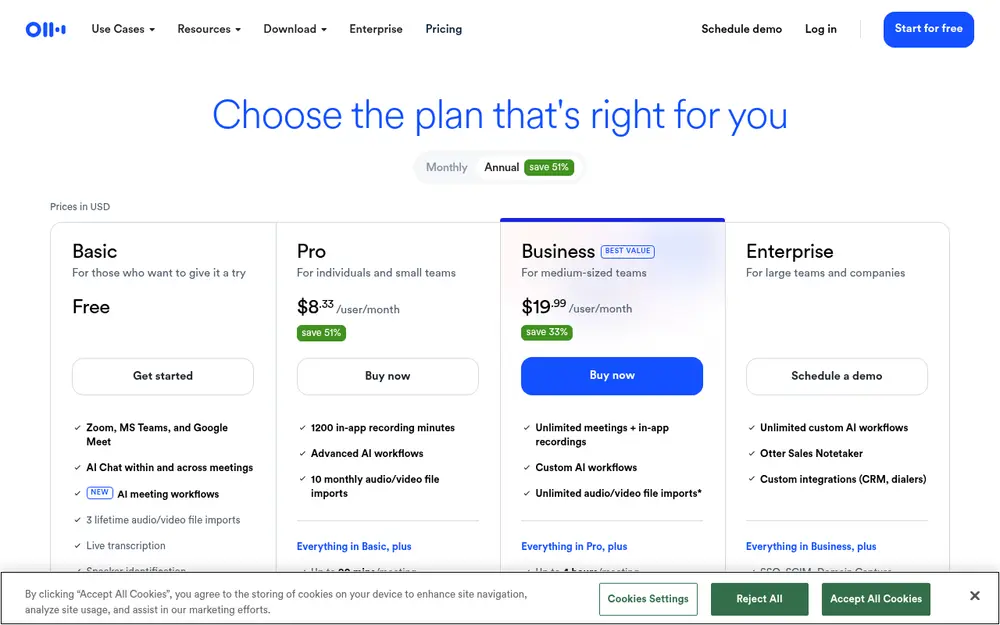
| Otter.ai | 300 transcription minutes a month, 3 lifetime file imports, 20 AI Chat queries a month | Pro $16.99/user/month ($8.33 billed yearly) | Monthly minutes don't roll over |
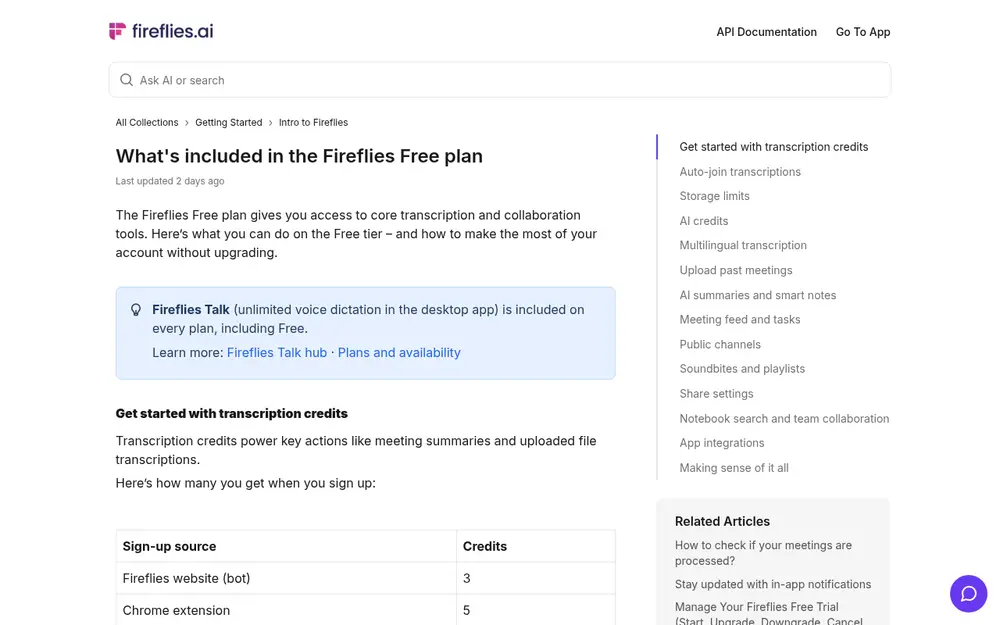
| Fireflies.ai | Auto-join transcription of eligible meetings; a few sign-up credits for summaries; 20 AI credits a month; 400 minutes storage | See Fireflies pricing | Summaries use credits; downloads need a paid plan |
| Zoom (ZoomMate) | ZoomMate Basic: meeting summaries for 3 hosted meetings a month, 20 AI queries a month | ZoomMate license | Your admin's settings and how attendees are notified |
Limits from each official page on 2026-10-21. Toolnary hasn't run a head-to-head accuracy test.
Otter joins Zoom, Microsoft Teams and Google Meet to transcribe live, identify speakers and write summaries with action items. The free Basic plan includes 300 transcription minutes a month (no rollover) and 3 file imports in total. Pro adds 1,200 minutes, up to 90 minutes per meeting and more imports. Light users may be fine on Basic; daily meetings will hit the cap.
Fireflies' Free plan article says Auto-join allows unlimited transcription of eligible meetings. That does not mean everything is unlimited: AI summaries and uploaded files use transcription credits (3 to 10 at sign-up, depending on how you join), advanced features use 20 monthly AI credits, storage is 400 minutes per seat, and downloading transcripts needs a paid plan. It supports over 100 languages.
Zoom has renamed its AI assistant ZoomMate. Zoom's product page lists a ZoomMate Basic tier with meeting summaries and in-meeting questions for 3 hosted meetings a month and 20 AI queries a month; more needs a ZoomMate license and uses AI credits. Before buying a third-party tool, ask your admin what's enabled and how attendees are notified.
A transcript is raw material. Ask your note taker (or a chatbot like ChatGPT or Claude, with a transcript you're allowed to share) for:
If no owner or date was given, it should say "not assigned" instead of inventing one.
From these meeting notes, list (1) decisions, (2) tasks with owners and due dates, (3) unresolved questions and (4) risks. Quote the sentence that supports each decision where possible. If a detail wasn't mentioned, write "not specified".
An AI meeting assistant that joins Zoom, Teams and Google Meet to transcribe and summarize.
An AI note taker that records, transcribes and summarizes meetings, with tasks and integrations.
Related: ✍️ Write better, faster🤖 AI agent and automation toolsWhat is an AI agent?
Not sure where to start? Take the quick quiz and get a pick for your task.
For a simple start, Otter.ai's free Basic plan gives 300 transcription minutes a month. Fireflies.ai's free plan can auto-join and transcribe eligible meetings without a cap, but AI summaries use a small number of credits. If your company already uses Zoom, check ZoomMate first. Otter: Basic plan: 300 transcription minutes a month (no rollover), 3 lifetime file imports, 20 AI Chat queries a month. Pro is $16.99/user/month ($8.33 billed yearly). (checked 2026-10-21)
Yes. Otter, Fireflies and Zoom's ZoomMate Basic all have free options, each with limits on minutes, summaries, storage or AI queries.
No. Names, acronyms, numbers and who said what can come out wrong. Check decisions and deadlines against the recording before you share notes.
Don't. Recording and consent rules differ by country, state, workplace and platform, and some places require everyone's consent. Tell participants a note taker will join and follow your organization's rules. This is general information, not legal advice.
Some do. Otter lists English, Spanish, French, German, Japanese and Chinese; Fireflies says it supports over 100 languages. Check your exact language and accents with a short test meeting.
Toolnary has not run controlled benchmarks of these products. Plans, limits and features change often, so check the official page before you rely on a limit.