Claude
A thoughtful chat assistant that is great at writing, long documents and careful reasoning.
Home / Guides / Comparisons
Published 2026-10-21 · Sources checked 2026-10-21
Quick answer: don't look for one "ChatGPT replacement". Look for the tool that does your job well. Claude for drafting and long documents, Perplexity for answers with sources, Gemini if you live in Google apps. All have free plans, so test a real task before paying.
Just choosing between the big three? Our ChatGPT vs Claude vs Gemini comparison goes side by side. This guide is for when you already know ChatGPT and want something different.
| Tool | Why you might choose it | Check first |
|---|---|---|
| Claude | Writing, long documents, careful edits | Free usage resets on a 5-hour window; Research and Claude Code need Pro |
| Gemini | Everyday help inside your Google account | Which Google app connections work on your account |
| Perplexity | Web research with numbered, clickable sources | Limits on Pro searches and Research queries |
| Microsoft Copilot | Free help in Windows and Edge, voice chat | Microsoft doesn't publish exact free limits |
| Mistral Le Chat | A fast European alternative with search and documents | Free limits aren't published as counts |
Starting suggestions based on each product's official pages, not head-to-head test results.
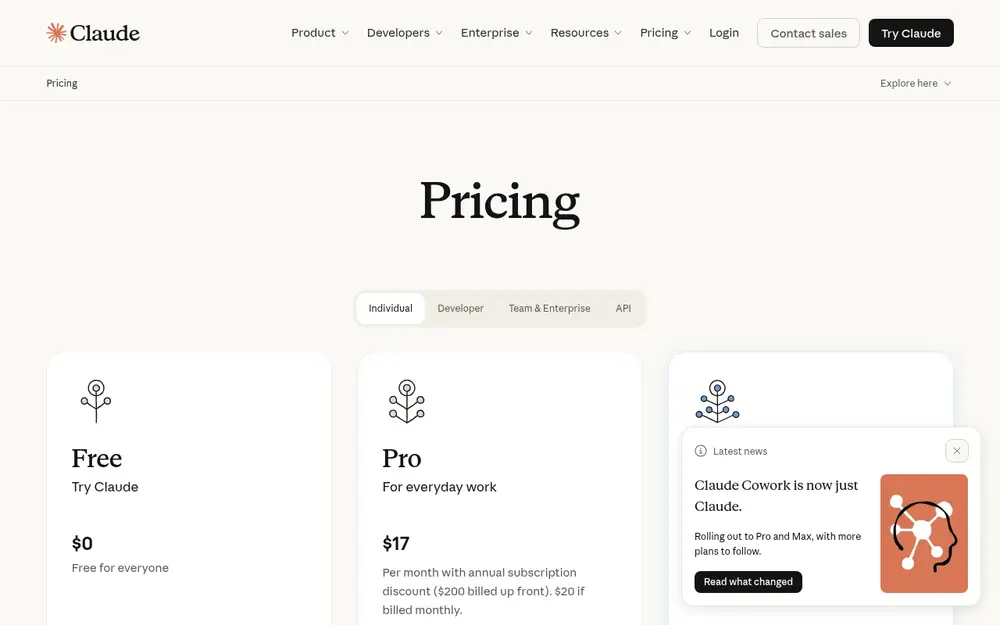
Claude's free plan includes chat, web search, file creation, connectors and up to 5 Projects. Pro ($20/month, or $17/month billed yearly) adds more usage, Research and Claude Code. Anthropic doesn't publish a fixed message count: usage resets on a rolling 5-hour window.
Try it on: rewrite one real email in two tones, then count how many edits you still have to make yourself.
Gemini is Google's assistant and signs in with your Google account. Free limits: Compute-based allowance refreshing every 5 hours up to a weekly cap; image generation and Deep Research available on free accounts. (checked 2026-10-20). If you rely on Gmail, Docs or Drive, check which connections actually work on your account rather than assuming every demo feature is in the free plan.
Try it on: paste your project notes and ask for a plan with dates, then check every step it claims to have done.
Perplexity answers questions using web sources and shows numbered links you can click. Free limits: Basic searches practically unlimited; 3 Pro Searches a day; 1 Research query a month; 3 uploads a day. (checked 2026-10-20). That makes it a strong pick when your priority is finding and checking current information. More in best AI tools for research.
Try it on: find the newest official announcement for a product you use, then open the source and confirm the date yourself.
Microsoft Copilot is free with a Microsoft account and built into Windows and Edge. Mistral Le Chat covers chat, web search, images and documents. Neither publishes exact free-plan counts, so expect limits on heavy use.
A general chatbot isn't always the best tool for transcription, images or building a website. If you do one task a lot, a focused tool may save more time than switching chatbots: try an AI meeting note taker, an image generator or an AI website builder.
I run a small website about AI tools. Draft a beginner-friendly 300-word comparison of two products. Use only current official feature pages, include limitations, and do not claim firsthand testing. End with one paragraph on who each is for.
A thoughtful chat assistant that is great at writing, long documents and careful reasoning.
Google's AI assistant, built into your Google account, good for questions, images and research.
An AI search engine that answers with sources you can click and check.
Microsoft's free AI assistant for chat, images and help inside Windows and Edge.
A fast European AI assistant for chat, search, images and documents.
A chat assistant that answers questions, writes, explains and brainstorms with you.
Related: ChatGPT vs Claude vs Gemini💬 Chat with an AI assistantBest AI tools for research
Not sure where to start? Take the quick quiz and get a pick for your task.
There is no single winner. Claude is worth trying for writing and long documents, Perplexity for answers with clickable sources, Gemini if you live in Google apps, and Microsoft Copilot if you use Windows and Edge. Try the same real task in two of them and keep the one that needs fewer edits.
Claude, Gemini, Perplexity, Microsoft Copilot and Mistral Le Chat all have free plans with usage limits. For example, Claude: Free usage allowance on a rolling 5-hour window (no fixed message count); web search, file creation, connectors and up to 5 Projects included; Research and Claude Code need Pro ($20/month, or $17/month billed yearly). (checked 2026-10-21)
Accuracy depends on the task, the model, whether it searched the web, and whether you checked the answer. No assistant is reliably right about everything, so verify important facts at the source.
Check each product's data retention and training settings, any business agreement, and your employer's policy before uploading anything confidential. Claude, for example, lets consumer users opt out of model training.
Only if another tool does your real tasks better at a cost you're happy with. Many people keep ChatGPT and add one specialist, like Perplexity for research.
Toolnary has not run controlled benchmarks of these products. Plans, limits and features change often, so check the official page before you rely on a limit.